
Google Business Profile & Website SEO
Connect your website with local search and Google Maps
Google Busines Profile
For Adelaide small businesses serving a local market, Google Business Profile is an important part of the wider online presence.
A complete and accurate profile helps potential customers understand who you are, what you do, where you operate and how to contact you. It also gives Google useful information when matching businesses to relevant searches in Google Search and Maps.
Your website and Google Business Profile should support each other. The profile provides quick local information, while your website gives customers the depth they need to understand your services, experience and business.

149
149 5-star Google reviews from our clients

Top 3
Rated Adelaide’s Top 3 web designers for 8 years in a row, 2018-2025
Setting up your Google Business Profile for better visibility
Google Business Profile is free to create and manage. You will be asked to provide information such as your business name, category, address or service area, phone number, website, opening hours and business description.
Google will also ask you to verify that you are authorised to represent the business. The verification method varies and may include phone, email, video, live video or postcard, depending on the options Google provides for your profile.
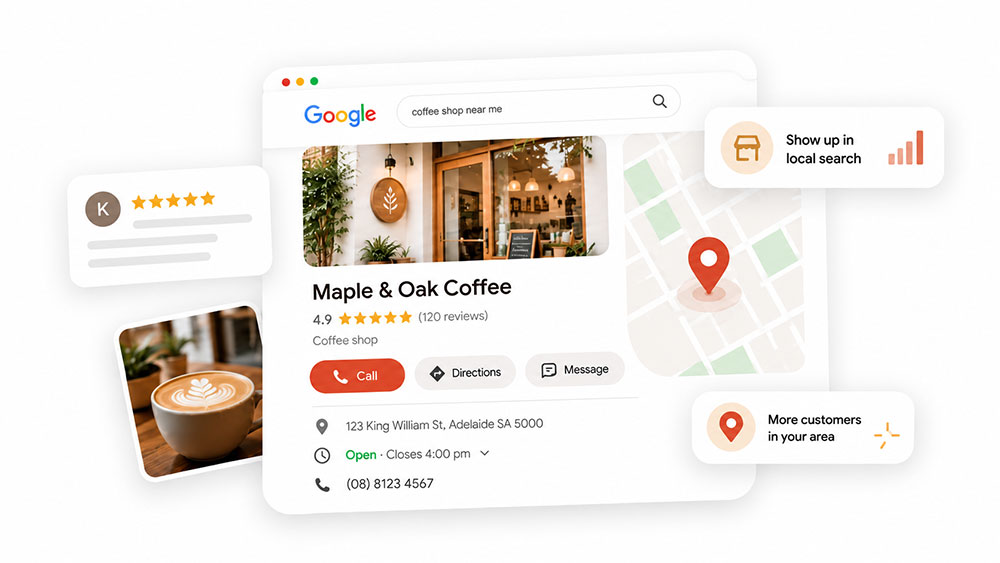
Improve local visibility with Google Business Profile map listings
When people search for a local service or business, Google may show relevant businesses within its map results, including information such as business names, reviews, opening hours, contact details and websites.
Google says local results are mainly influenced by relevance, distance and prominence. Keeping your Business Profile complete and accurate helps Google understand what the business offers and how relevant it may be to a local search.
Local businesses should consider a free Google Business Profile
If your customers search locally for the services you provide, a Google Business Profile gives the business another opportunity to be found through Search and Maps.
The important part is not simply creating the listing. Keep the information current and consistent with what customers will find on your website.
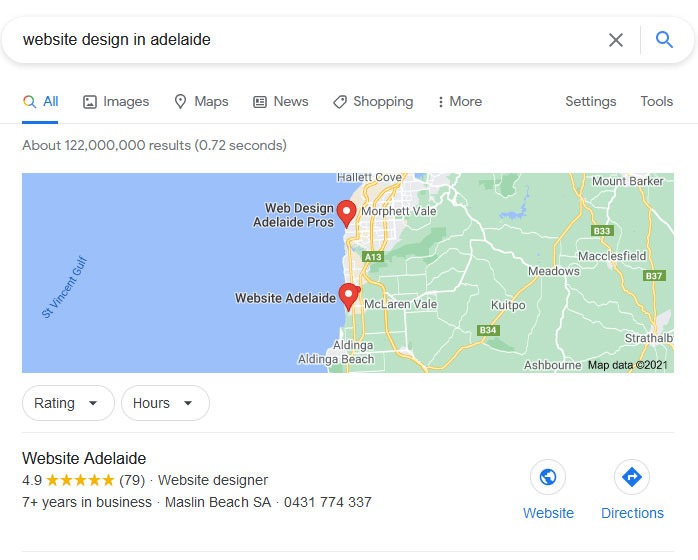
Showcase your business through Google Search and Maps
When someone searches for your business by name, information from your Google Business Profile may appear prominently within Google Search or Maps.
Customers may see your contact details, opening hours, reviews, photos, services, website and location or service area before they visit the website.
This makes the profile an important extension of your broader online presence, and the information should reflect the same business positioning and core details shown on your website.
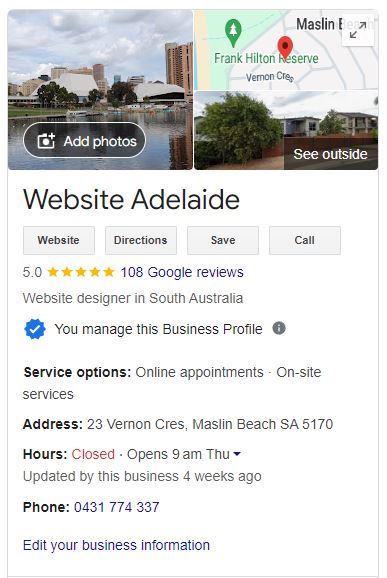
Manage your Google Business Profile directly from Search
When you are signed into the Google account that manages your Business Profile, searching for your business gives you access to profile management tools directly through Google.
From there you can update information, add photos, manage services, publish relevant updates and respond to reviews.
Google changes the interface and available features from time to time, but the priority remains the same: keep the information customers rely on accurate and up to date.
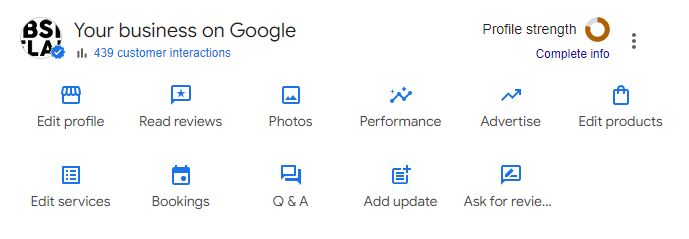
Keep your Google Business Profile accurate and useful
You do not need to post several times a week simply to make the profile look active.
Instead, review the information periodically and keep opening hours, contact details, services, website links, photos and service areas current. Posts can be useful when you have a genuine update, event, offer or new service worth sharing.
Reviews are also important for local businesses. Encourage customers to leave honest feedback and respond where appropriate. Google states that review quantity and positive ratings can contribute to local prominence.
Summary of what you can do inside Google Business Profile
Business Information
Keep your business name, address or service area, contact details and opening hours accurate. Add your website so customers can move from the profile to more detailed information about your services and business.
Posts
Use posts for genuine updates, offers or events. Where relevant, you can direct customers to a useful page on your website for more information.
Special Attributes
Google may provide attributes relevant to your business category, such as accessibility, amenities or service options. Use the attributes that accurately apply to your business.
Service Areas
Businesses that travel to customers can define the areas they genuinely serve. Keep these realistic rather than adding locations simply for search visibility.
Products
Eligible businesses can showcase products with descriptions, images and pricing where appropriate. Keep the information current and consistent with the website.
Performance
Google Business Profile provides performance information that can help you understand how customers find and interact with the listing, including areas such as profile views, website clicks, calls and direction requests.
Use this information alongside website analytics and Search Console for a broader view of how people are finding the business.
Opening Date
Where available, adding your opening date can give customers useful context about how long the business has been operating.
Services
Add the services your business genuinely provides and include clear descriptions where appropriate. This helps customers understand what you offer and gives Google more context about the business.
Bookings
Eligible businesses may be able to connect booking functionality or supported booking providers. Check which options Google currently provides for your category and location.
Menu for restaurants and cafés
Hospitality businesses can add menu information where available. Keep it accurate so it reflects what customers will find on your website and at the venue.
Add a Logo and Cover Photo
Use your logo and appropriate business imagery to make the profile recognisable and consistent with the wider brand.
Photos and Videos
Add useful, current photos and videos showing the business, team, premises, products, services or work. Genuine imagery helps customers understand what to expect.
Questions and Contact Options
Google changes the ways customers can interact with Business Profiles over time. The previous Business Profile chat feature was discontinued in 2024, so make sure your current phone number, website and available contact options are easy to find.
Special Offers and Promotions
Eligible businesses can publish offers and promotions through their profile when they genuinely support current business activity.
How we help with Google Business Profile
Google Business Profile is not generally a standalone service for us.
We provide practical advice and assistance where it forms part of a new website, redesign or broader search visibility project. This may include checking the profile setup, reviewing categories and business information, connecting the website, looking at services and service areas, and providing guidance around imagery and reviews.
We also encourage clients to manage the profile themselves so important information can stay current after the website launches.
Why Google Business Profile matters
For locally focused businesses, Google Business Profile can help customers find accurate information through Search and Maps, see reviews, connect with your website and understand what the business offers.
The strongest result is usually when your Business Profile, website and wider online presence communicate a consistent picture of the business.
Mini guide: Set up Google Business Profile and collect reviews
Before you start
Have your business name, address or service area, phone number, website, logo, photos, opening hours, primary business category and a short description ready.
Keep this information consistent with your website and other important listings.
Create the profile
Search your business name on Google first to check whether a profile already exists. If not, follow Google's Business Profile setup process.
Choose the primary category that most accurately describes the business, add your contact details and website, and set an appropriate service area if you travel to customers.
Avoid creating multiple listings simply to target different suburbs unless those locations genuinely qualify under Google's guidelines.
Verify the business
Google will ask you to verify that you are authorised to manage the business.
The available method may include phone, email, recorded video, live video or postcard. Follow the verification option Google provides for your profile.
Complete the profile
Once verified, add the information relevant to your business. This may include your logo, cover image, current business photos, services or products, business description, service areas, opening hours and relevant attributes.
Use posts when you have genuine updates or offers worth sharing rather than simply to make the profile appear active.
Get your review link
Google provides businesses with a link that can be shared when asking customers for reviews.
From your Business Profile, find the option to ask for reviews or get more reviews, then copy and save the link so it can be used in follow-up emails, SMS messages or on your website.
Ask customers for honest reviews
The best time to ask is usually after the work has been completed and the customer has had a genuine experience with the business.
A simple message is enough:
Hi [Name], thanks again for choosing us. If you have a minute, we would really appreciate an honest Google review about your experience: [review link]. Thank you.
Do not tell customers what rating or wording to use, and do not offer incentives for reviews.
Show reviews on your website
Google reviews can also support trust on your website. You might add a Review us on Google link, display selected review excerpts with appropriate attribution, link visitors to your Google profile, or use a review widget where appropriate.
Reviews should support the website rather than replace detailed information about your services and experience.
Reply to reviews
Responding to reviews shows that customer feedback is noticed.
For positive reviews, thank the customer and keep the response personal. For negative reviews, remain professional, acknowledge the concern and move the discussion privately where appropriate.
Avoid using the same generic response for every review.
Important notes
Do not offer incentives for reviews or ask customers to leave a particular rating. Keep your profile information current, review opening and holiday hours, add useful new photos when you have them and use posts when there is something genuinely worth communicating.
Your Google Business Profile should support the same picture of your business that customers see on your website: clear services, accurate information, genuine experience and an easy way to take the next step.
Get a free website quote
Google Business Profile is only one part of your wider online presence, but for many Adelaide small businesses it is an important one.
A clear website gives customers the depth they need to understand your services and business, while your Google Business Profile provides local information, reviews and another way to find you through Search and Maps.
If you are planning a new website or redesign, we can help make sure these elements work together as part of the project.